
Securing an officially attested result card or certificate from the Board of Intermediate and Secondary Education (BISE) Lahore is a crucial step for students aiming to pursue higher studies, apply for local or international scholarships, or initiate the Inter Board Coordination Commission (IBCC) verification process.
Unfortunately, navigating the document attestation workflow can feel overwhelming. Many students face unnecessary delays or application rejections simply due to clerical errors, wrong portal selections, or an incomplete understanding of the verification path. This step-by-step guide simplifies the entire application form process, transforming complex guidelines into clear, scannable instructions to ensure a seamless, error-free experience.
Part 1: Step-by-Step Online Record Retrieval Process
Before BISE Lahore can physically attest your documents, your academic history must be retrieved and validated electronically through the board’s digital system. This initial screening bridges your physical certificate with the digital database.
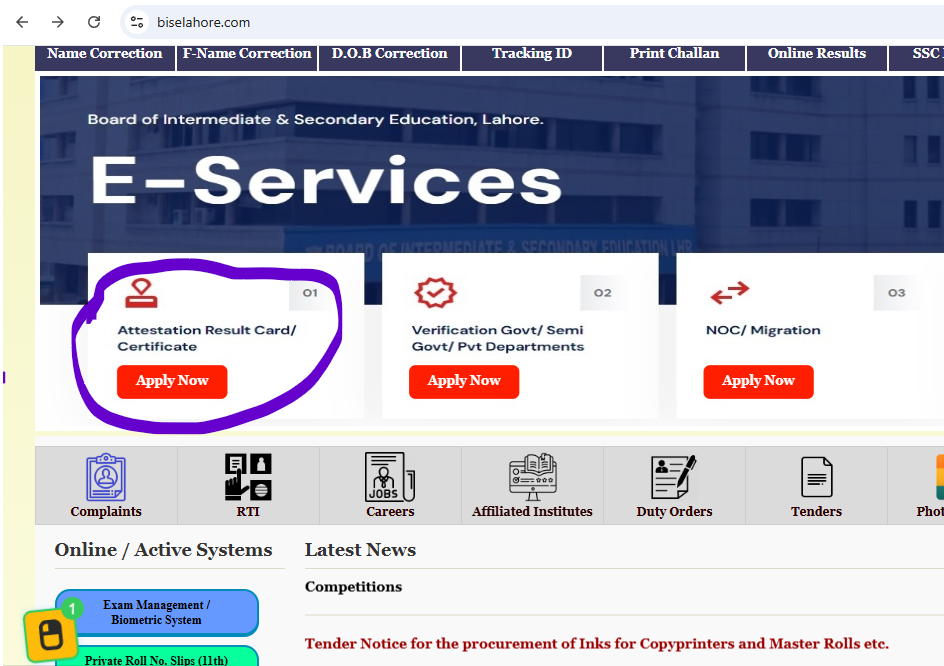
To get started, you need to navigate to the official attestation service via the BISE Lahore e-Portal:
You can access the official attestation service through the BISE Lahore e-Portal:
👉 https://eportal.biselahore.com/eservices/attestation
Academic Record Inputs Required for Verification
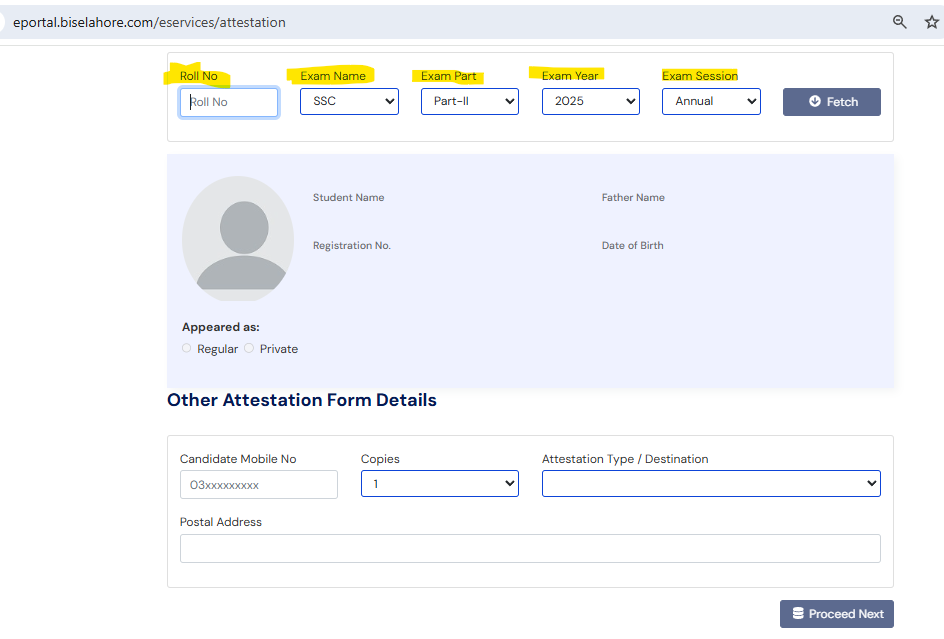
When you open the e-portal link, the system will prompt you to enter specific exam parameters. Enter these details exactly as they appear on your original slip:
| Required Input Field | Purpose & Correct Selection |
| Examination Roll Number | The precise, unique roll number assigned to you by the board for that specific session. |
| Examination Level | Select Secondary School Certificate (SSC) for Matric or Higher Secondary School Certificate (HSSC) for Intermediate. |
| Exam Section | Choose between Part-I (9th/11th class) or Part-II (10th/12th class) depending on the document you want attested. |
| Passing Year | The exact calendar year you appeared in and cleared the exam (e.g., 2026). |
| Exam Term | Select whether you cleared the paper in the Annual Examination session or the Supplementary/Second Annual session. |
⚠️ Crucial Tip: Double-check every digit of your roll number before clicking submit. A single wrong digit will cause a data mismatch error, preventing the portal from loading your record.
Part 2: Confirming Auto-Fetched Candidate Identity Data
Once you click the search button, the BISE Lahore system will pull your records directly from its main database and display your identity information on the screen.
This step serves as your digital identity confirmation. Carefully verify the following fields:
- Candidate’s Full Name: Must exactly match the spelling on your B-Form or CNIC.
- Father / Guardian Name: Check for correct spacing and characters.
- Registration Number: The alphanumeric identification code assigned to you during your initial enrollment.
- Date of Birth: Double-check the day, month, and year against your official government birth records.
What should you do if there is a mistake? If you spot a spelling error or an incorrect date of birth on this auto-fetched screen, do not proceed with the attestation form. Instead, visit the BISE Lahore branch office immediately to submit a data correction application, as proceeding with faulty data will result in document rejection down the line.
Part 3: Selecting Enrollment Status & Contact Configuration
After verifying your identity, you must categorize your academic background and provide active delivery channels so the board can dispatch your verified documents safely.
1. Enrollment Status Categories
Select your specific candidate type. This tells the board whether your record belongs to a school ledger or an independent stream:
- Regular Candidate: Choose this if you were officially enrolled through a recognized school or college in Lahore and your admission was forwarded by an institution.
- Private Candidate: Choose this if you prepared independently, filed your admission on your own, and appeared at an assigned external center.
2. Request Data & Courier Configuration
Next, complete the contact and purpose sections of the application form:
- Mobile Contact Number: Provide an active, working mobile number. The board utilizes this number to text you application tracking IDs and verification updates.
- Number of Copies: Specify the exact number of verified or duplicate copies you want the board to seal or attest.
- Attestation Purpose: State clearly why you need this attestation (e.g., “For IBCC Verification”, “For Foreign Visa Embassy Processing”, or “For Higher Education Admission”).
- Postal Address: Write your complete, permanent home address. BISE Lahore utilizes secure courier networks to send sealed, attested envelopes back to candidates. Ensure you include your sector, street number, house number, and landmark.
Part 4: Complete Action Plan to Apply Successfully
To prevent delays or application loops, execute the application process using this sequential roadmap:
- Access the Portal: Navigate to the official BISE Lahore e-Services Attestation link.
- Input Credentials: Provide your Roll Number, Level, and Passing Year accurately.
- Confirm Identity: Thoroughly check the auto-fetched personal profile data displayed by the portal.
- Define Category: Select your correct enrollment path (Regular or Private).
- Configure Destination: Enter your active mobile contact information and detailed shipping address.
- Download Challan: Once the form is filled, the portal will generate an application form along with a customized bank fee challan.
- Submit Fee & Fee Documents: Pay the required fee at the designated bank branch (usually HBL). Keep your original paid copy safe, and submit the physical documents to the board if required by your specific attestation type.
Frequently Asked Questions (FAQs)
Q1: How do I get an officially attested copy of my result card from the Lahore Board?
You must initiate the process via the BISE Lahore e-portal attestation system, fill out your exam credentials, select your purpose, print the auto-generated bank challan form, and pay the verification fee. The board will then issue your attested copies.
Q2: I need my certificate verified by IBCC. Does the Lahore Board handle this directly?
No, BISE Lahore does not handle IBCC attestation directly. However, IBCC will only attest your certificate if it has first been verified and sealed in a secure envelope by your respective board (BISE Lahore). You must complete the Lahore Board verification process first, receive the sealed envelope, and then present that unopened envelope to the IBCC office.
Q3: What documents do I need to keep ready before applying online?
Before filling out the online form, ensure you have your original board-issued result card or certificate, a clear copy of your CNIC or computerized B-Form, your intermediate/matric roll number details, and your registration number.
Q4: How much does the subsequent IBCC attestation cost?
The fee structure for the final IBCC attestation depends on your selected processing speed (Normal vs. Urgent) and the total number of certificates you wish to attest. Because fees are subject to adjustment, you should check the current rates on the official web portal of the Inter Board Coordination Commission once your board documents are securely sealed.
Summary of the Attestation Workflow
By treating this process as a clear step-by-step ladder—starting with online data entry, moving to information verification, and concluding with proper purpose mapping—you eliminate the stress of handling administrative paperwork. Always ensure your inputted records align perfectly with your official educational history to secure a swift, hassle-free attestation experience.