
Changing your college, shifting to a different district, or switching your educational board system entirely can be highly stressful. During this transition, the most critical document you will be asked to provide is an official NOC (No Objection Certificate) or Migration Certificate from the Board of Intermediate and Secondary Education (BISE) Lahore.
Many students face unnecessary processing delays simply because they don’t understand the online portal fields or mistake the tracking sequence. This authoritative guide explains the step-by-step digital application process, fee management via automated challans, and tracking strategies for the 2026 academic cycle.
Section 1: Understanding the Purpose of an NOC
An NOC is a formal legal clearance certificate issued by BISE Lahore. It states that the parent board has no administrative or academic objection to transferring your student registration record over to another regulatory educational body.
When Is a Migration Certificate Mandatory?
- Board-to-Board Shifts: Moving from BISE Lahore to another regional board within Punjab (e.g., BISE Multan, BISE Rawalpindi) or a federal board (FBISE).
- Inter-Provincial Migration: Relocating your academic profile outside of Punjab (e.g., Karachi Board, KPK Boards).
- University Transitions: Moving directly into an independent degree-awarding university track that requests direct verification from your intermediate body.
Section 2: Online Portal Initial Data Selection
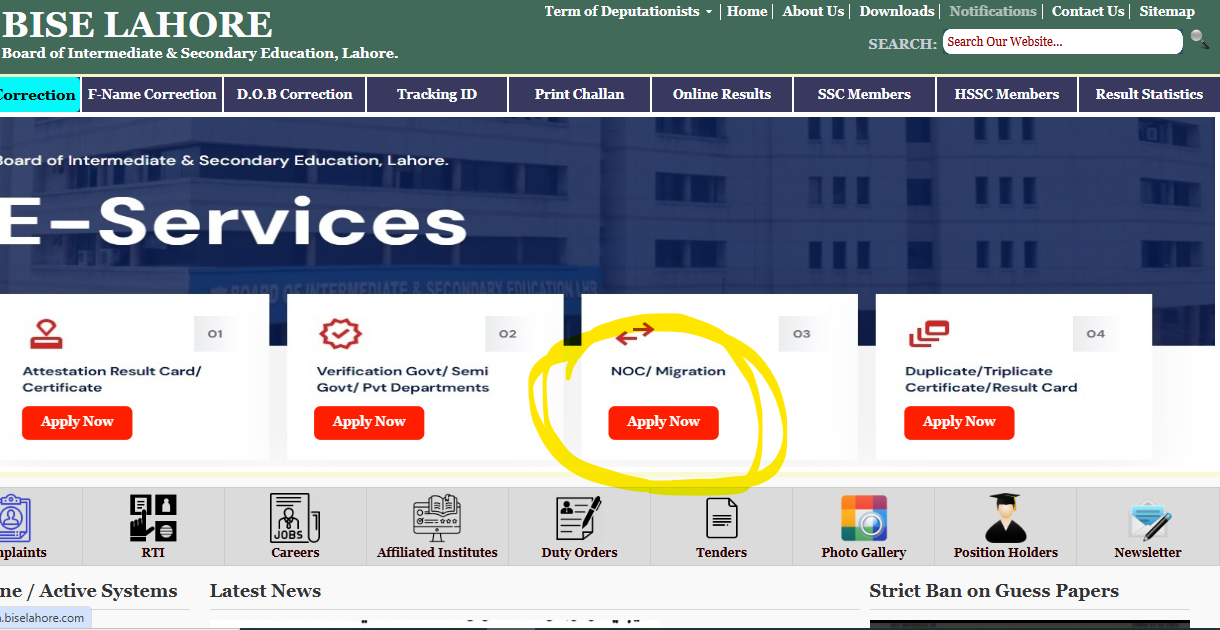
BISE Lahore handles all migration streams through its official digital hub. Students can initiate their records entirely from home via the BISE Lahore E-Services Portal.
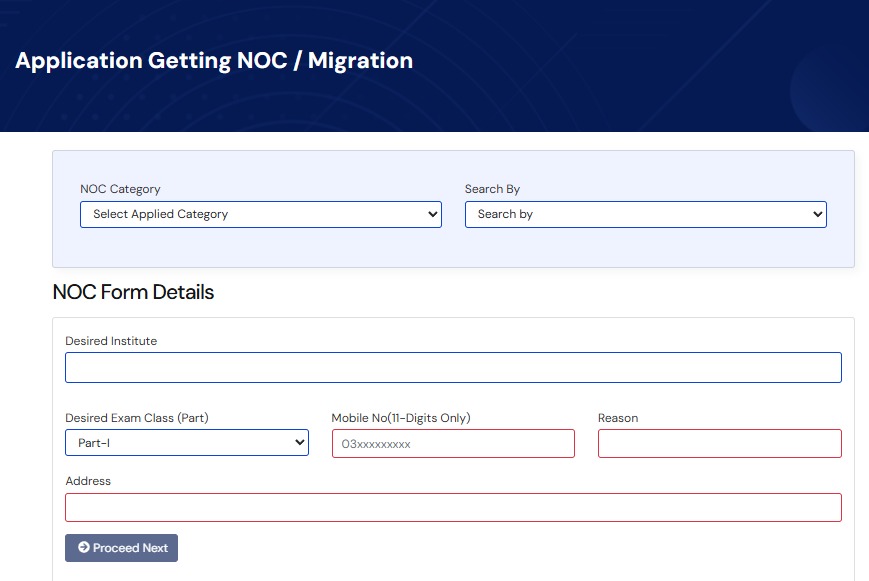
When launching your request, you must navigate the entry portal using two core metrics:
| Selection Target | Operational Purpose | Field Entry Type |
| Applied NOC Category | Determines your destination. | Select Inter-Board, Inter-College, or University Migration. |
| Search Method | Tells the system how to locate your academic history. | Select search by Roll Number (if previously admitted) or Registration Number. |
Section 3: Step-by-Step Portal Application Process
Once the system fetches your basic name and parentage from the board database based on your roll number, you must fill out the final processing fields accurately.
                    BISE Lahore NOC Processing Pipeline

  [ Portal Entry ]   ---> Select Search Method (Roll No / Year / Session)
                                   |
  [ Info Input ]     ---> Enter Target Institute Name & Mobile Contact
                                   |
  [ Challan Print ]  ---> Generate & Print System-Generated Fee Slip
                                   |
  [ Bank Payment ]   ---> Deposit Fee at Designated HBL Bank Branch
                                   |
  [ Online Tracking] ---> Monitor Approval Status via Tracking ID
Detailed Information Field Breakdown:
- Target Institute / Board: Type the complete, official name of the destination educational body or college you are transferring to. Do not use informal abbreviations.
- Exam Level / Part: Clearly specify your last active status (e.g., SSC Part-I, SSC Part-II, HSSC Part-I, or HSSC Part-II).
- Active Contact Number: Provide an active 11-digit mobile number. The board’s automated e-portal uses this specific line to send you your application’s unique Tracking ID and automated approval SMS updates.
- Reason for NOC: State your reason briefly and clearly (e.g., “Family relocation to another city” or “Admission secured in a different institutional jurisdiction”).
- Residential Address: Write your full, current postal address where the physical certificate can be securely delivered via registered courier.
Section 4: Post-Submission Steps — Fees & Application Tracking
After you submit the form online, the portal will automatically generate an HBL (Habib Bank Limited) Fee Challan.
- Fee Clearance: Download and print the challan form on standard paper. Visit any online branch of HBL to deposit the migration fee.
- Tracking Your Status: You can check the progress of your application at any time by visiting the official tracking page. Simply select Search By Tracking ID, enter your number, and click search to view its real-time approval status.
- Automatic Verification: You do not need to physically drop off the paid receipt at the board office. The bank’s digital system automatically updates your payment status on the BISE Lahore servers within 24 to 48 hours.
Will applying for an NOC cancel my existing BISE Lahore board results?
No. This is a common point of anxiety for students. Applying for a migration certificate safely detaches your future registration profile so you can take upcoming exams elsewhere. It never alters, drops, or cancels the valid marks or certificates you have already earned under the Lahore Board.
Also Read About: Top 10 Colleges in Lahore for FSC & ICS Students
What should I do if my current college refuses to clear me?
If you are pursuing an Inter-College migration within the same board, your current college must click “approve” on their internal portal. If a college creates unnecessary hurdles despite a valid reason (like moving houses), you can submit a formal written application directly to the Secretary of the Board at the BISE Lahore physical office for administrative intervention.
Can I re-print my application form if I lose it?
Yes. By using the e-portal’s history and tracking tools, you can easily pull up your data again using your registration number or original roll number.
Summary Checklist for Exam Success
- Check for typographical errors in your mobile number and postal address before hitting submit.
- Make sure your destination board or college name matches your new admission offer letters precisely.
- Keep your printed copy of the paid HBL challan slip safe until the physical NOC is delivered to your doorstep.
By using the online e-portal systematically and following these exact steps, you can avoid long center lines, eliminate processing delays, and transition seamlessly to your next educational milestone.
For a visual walkthrough of the online form layout and mobile application tricks, you can watch this Detailed Guide on Lahore Board Online NOC Registration. This video step-by-step tutorial is highly useful because it demonstrates how to accurately navigate the E-Services portal and generate your payment challan without making mistakes.